
Introducing Digital Elimu
Why we built a classroom app that makes lessons feel like virtual reality, and what it can do today.
Read moreDigital Elimu turns any classroom screen into an immersive lesson space, where content moves, builds and responds as the teacher teaches.
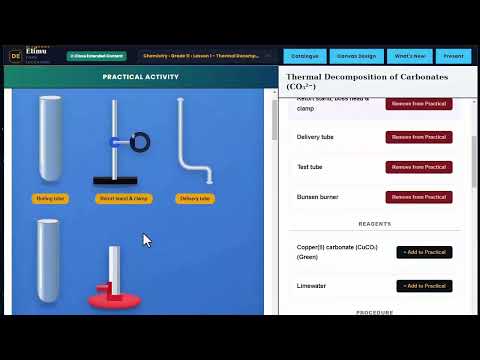
Teachers open a lesson and present it. Diagrams build step by step, tools move as they would in the hand, and every lesson works without internet.
Content appears in depth and motion, so learners watch ideas take shape instead of reading static slides.
On-screen instruments the teacher can pick up and use live, exactly as the class would in real life.
Download lessons once and teach anywhere. No data bundles, no buffering in front of the class.
One computer shares its lessons with others nearby over a hotspot. One download serves the whole school.
Approved publishers create their own lessons, publish them and teach with them. New lessons reach every teacher under What's New.
Each copy is activated with its own licence code, and lessons only open inside Digital Elimu.
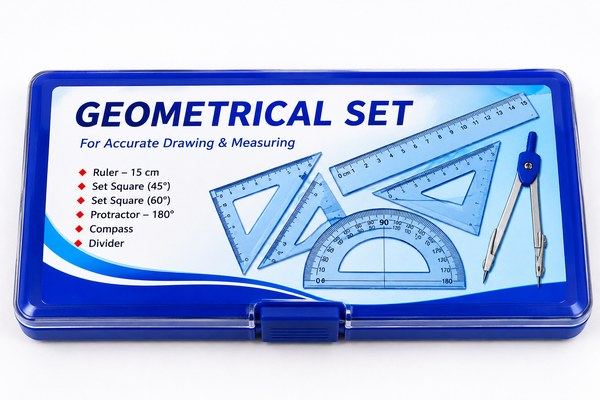
The teacher drags, rotates and measures with real-looking tools on the big screen. Every learner sees each step clearly.

Apparatus appears on screen and responds as the teacher uses it, so a practical can be shown in any classroom.
Short clips of real lessons running in Digital Elimu.
One line about what this clip shows.
One line about what this clip shows.
One line about what this clip shows.
Digital Elimu was created by Justus Mwanthi, a private Mathematics and Statistics tutor. After years of explaining ideas on a board, he wanted learners to see them happen: shapes that build in front of them, tools that move as they would in the hand, and lessons that hold attention from the first minute to the last.
The result is a desktop app that turns a projector or classroom screen into an immersive lesson space. It was designed for real classrooms: computers that are not always online, schools that share one internet connection, and teachers who need a lesson to open instantly and run without fuss.
Lessons are created by publishers that Digital Elimu approves. Publishers build their lessons in the Digital Elimu Content app, teach with them and share them with every licensed teacher through the online catalogue. Lessons work only inside Digital Elimu, which protects the work of everyone who creates them.
Download the app, get your licence code, and activate once.
Version 1.0.0 · about 80 MB
Download coming soon| System | Windows 10 or Windows 11, 64-bit |
|---|---|
| Memory | 4 GB RAM or more |
| Storage | At least 1 GB free, plus space for the lessons you download |
| Internet | Once to activate, and whenever you download new lessons |
| Display | Any screen or projector |
Every copy of Digital Elimu is activated with its own reference code. A licence lets you use the app and every lesson in the catalogue for the period stated when you buy it.
New features, guides and news from Digital Elimu.
Why we built a classroom app that makes lessons feel like virtual reality, and what it can do today.
Read moreShare lessons between computers over a hotspot, without spending data on every machine.
Read moreHow approved publishers create lessons, teach with them and share them with every licensed teacher.
Read moreOnly to activate your licence the first time and to download new lessons. After that, every lesson you have downloaded opens and runs completely offline.
Open Digital Elimu, accept the Terms of Use and type the reference code we sent you. Make sure the computer is online for this step. Activation takes a few seconds, and you do not need to do it again on that computer.
Open the lesson catalogue in the app, choose a lesson and download it. New lessons appear under What's New. Downloaded lessons are saved on your computer and open instantly.
Local Sharing lets one computer share its downloaded lessons with other licensed Digital Elimu computers nearby, over a hotspot or the same network, without internet. One computer downloads; the rest copy from it.
Publishers registered and approved by Digital Elimu. They create lessons in the Digital Elimu Content app, teach with them, and publish them to the catalogue for every licensed teacher. If you would like to publish, contact us and choose Publishing lessons.
No. Lessons work only inside Digital Elimu. This protects the work of the people who create them.
Yes. Windows shows this for new software it has not seen often. Click More info, then Run anyway. Always download Digital Elimu from digitalelimu.app.
Contact us with your reference code and we will help you move to the new computer.
The app keeps working for a short grace period with limited features. Renew before the grace period ends and everything continues as before, including your downloaded lessons.
Licences, schools, publishing lessons or help with the app. Send a message and we will reply by email.